Expressions
Table of Contents
1. Expressions
An expression describes a computation and evaluates to a value. Some examples are:
2: number or numeralpi: name'are you human': stringabs(-1): call expression
The first three are known as primitive expressions. Symbols like + and * can also be expressed using a call expression, being add() and mul() respectively.
1.1. Call Expressions
A call expression is made up of an operator and operands. In add(1, 2), the add is the operator, and the 1 and 2 are operands.
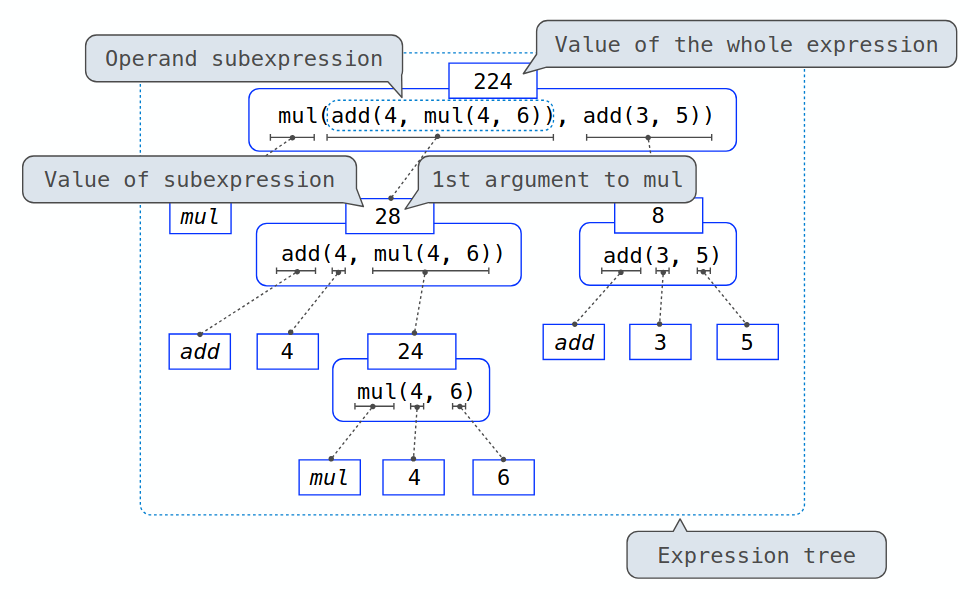
The evaluation procedure for call expressions is: (1) evaluate the operator –> function (2) evaluate each operand –> argument (3) apply the function to the arguments
We can write out an expression tree with subexpressions as well:
1.2. Boolean Expressions
A boolean expression is made up of a left and right subexpression and a boolean operator.
1.2.1. Procedure for and
To evaluate the expression <left> and <right>:
- Evaluate the subexpression
<left>. - If the result is a false value
v, then the expression evaluates tov. - Otherwise, the expression evaluates to the value of the subexpression
<right>.
1.2.2. Procedure for or
To evaluate the expression <left> or <right>:
- Evaluate the subexpression
<left>. - If the result is a true value
v, then the expression evaluates tov. - Otherwise, the expression evaluates to the value of the subexpression
<right>.
1.2.3. Procedure for not
To evaluate the expression not <expr>:
- Evaluate the subexpression
<expr>. - The value is
Trueif the result is aFalsevalue, and the value isFalseif the result is aTruevalue.
1.2.4. Short-Circuit Evaluation
Notice that for these logical operators, once <left> is evaluated to either false for and or true for or, the interpreter does not evaluate <right>. This is important because sometimes, we want to use <left> to check for a condition that would otherwise make evaluating <right> undefined behavior. This behavior is known as short-circuit evaluation.
1.3. Lambda Expressions
Lambda expressions allow us to return a function value and bind it to a name. You can think of a lambda expression as an "anonymous" function. For example:
square = lambda x: x * x
This allows us to, for example, immediately call the function without a name:
a = (lambda x: x * x)(3) # 9
This is a function with a formal parameter x that returns the value of x * x. Notice that there is no return keyword: it automatically returns the expression evaluated after the colon. This limits lambda expressions to evaluating and returning a single expression.
Unlike def statements, a lambda expression does not give the function an intrinsic name. When we inspect what square is, we find that is a lambda function, and not a function of name square.