Memory
Table of Contents
1. Pointers
A bit is a single binary digit, corresponding to a single 1 or 0. A byte is a collection of 8 bits. A nibble is a collection of 4 bits. Most modern systems are 32-bit or 64-bit systems. Usually, these systems only work with either 32 bits or 64 bits at a time.
The memory of a program acts like a large array of bytes, with each cell of the array having a corresponding memory address. Since each cell stores one byte of data, we can use adjacent cells to store larger values. Even if a value takes up multiple addresses, we say that the value is located at its lowest memory address.
A pointer is a type of variable that contains the memory address of another variable — in other words, it “points” to a memory location. All pointers are the same size: 4 bytes in a system with a 32-bit address space. In C, pointers are declared by adding a star (*) next to the pointed type:
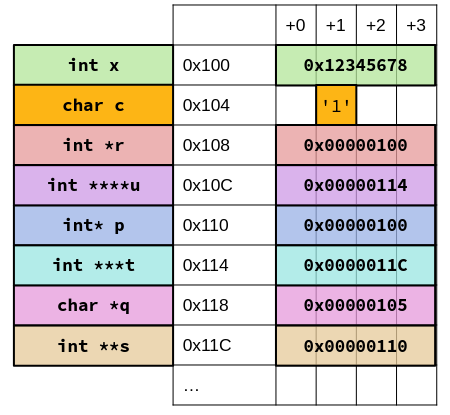
The & is the address operator: it gets the address of a variable. The * is the dereference operator: it gets the value pointed to by the variable. For example:
int *p;      // pointer p
int x = 3;   // set x to 3
p = &x;      // set p to the memory address of x
*p = 5;      // dereference p, and set it to 5 (sets x to 5)
The pointer of all 0s is the NULL pointer. Reading from or writing to a null pointer should cause your program to crash.
C is pass-by-value: a function parameter gets assigned a copy of the argument value. Thus, if we want to pass in a lot of data (such as a large struct), a better approach is often to pass in a pointer instead, and dereference the struct inside the function. The arrow notation is often used for this: d->x is the same as (*d).x.
1.1. Function Pointers
Pointers can also point to functions:
int *(*fp) (int, int) = &foo;   // function fp (int, int) -> int*
int *(*fp) (int, int) = foo;    // can only be omitted for function pointers
We can then use the function by calling (*fp)(x, y).
1.2. Generic Pointers
The void* pointer is the generic pointer, which means a “pointer to anything.” Thus, you can never dereference a void* pointer (since you don’t really know what void is), or do pointer arithmetic with void* pointers (since you don’t know the size of the data type represented). You can, however, safely convert void* pointers into other pointer types.
We have two main functions to work with memory:
1.2.1. void *memcpy(void *dest, void *src, size_t count)
This copies count bytes from src to dest. Undefined behavior if src and dest overlap.
1.2.2. void *memmove(void *dest, void *src, size_t count)
This copies count bytes from src to dest, but there are no problems if src and dest overlap. However, this function is slower than memcpy.
2. Arrays
An array is just a block of variables of the same type, in consecutive memory addresses:
int arr[2];
int arr_filled[] = {795, 635};
int x = arr_filled[0];
In most circumstances, if an array is used as a variable, it is interpreted as a pointer to the first element. Note that arr (which returns the address of the first element) is the same as &arr.
2.1. Pointer Arithmetic
Since pointers are just numbers, you can add and stubrtact to them. When you add n to a int pointer, we increment the memory address in the pointer by n*sizeof(int):
uint32_t arr[] = {50, 60, 70};
uint32_t *q = arr;     // points to 50
uint32_t *r = q + 1;   // now points to 60
In reality, arr[1] is just shorthand for *(arr+1). Because of how C defines pointer arithmetic, it works the same way as usual array access.
3. Strings
Unlike with numbers, there’s no “natural” way to assign bitstrings to characters. The current standard is ASCII, where each character uses 8 bits of data (one byte).
Strings in C are defined as arrays of characters. The problem is, C arrays don’t know their own length, so if we want to print out a string, we need to know when to stop printing. To solve this issue, we must include the byte 0 ('\0', NULL) to represent the end of a string, called the null terminator. Any string literals in code will automatically add a null terminator.
4. Memory Model
The C memory model describes how a program’s data is stored in memory during execution. Memory is divided into several sections, like so:
4.1. Text and Data
First we have the text section: this stores your executable. It is fixed size, ideally not changed after loading the program and also includes constants that are “built-in” to the code.
Then, we have the data section: this stores anything that’s a fixed size, such as global variables (you only ever need one copy of a global variable) and string literals (you can determine how many string literals there are). Every unique string gets stored once, so if the same string literal appears several times, everything points to that one copy.
Thus, string literals are immutable if they are stored in data:
char *i = "Hi";
i[0] = 'P';      // error
4.2. Stack
Then we have the stack. Every function call sets aside a frame on the stack for local variables. These are designed for temporary storage: after a function returns, all the data in the stack frame gets freed. The stack contiguous and is of variable size: it grows downward (i.e. successively lower memory addresses) and shrinks as you return from functions. The bottom of the stack is marked by a stack pointer.
If strings are stored in the stack, they can be mutated:
char i[] = "Hi";
i[0] = 'P';      // fine
4.3. Heap
Finally, we have the heap. Since stack variables disappear when the function returns, any variables that need to persist across functions use the heap. In C, all heap memory must be manually allocated. Similarly, since C does not have a garbage collector, heap memory must also be manually freed. Not freeing allocated memory results in a memory leak.
The heap is a large pool of memory that is not allocated in contiguous order: the heap is run by a memory manager, which grows the heap upward as memory is allocated and downward as memory is freed.
4.3.1. void *malloc(size_t n)
The malloc function requires n consecutive bytes from the memory manager. The memory manager finds a block of open space and reserves that space for your personal use. If not enough memory can be found, a NULL pointer is returned.
However, the manager doesn’t erase anything in that space: it is your responsibility to free the memory in that space.
4.3.2. void free(void *ptr)
The free function gives the block pointed to by ptr back to the memory manager. ptr must be a pointer that was returned by the memory manager earlier that hasn’t been freed. Trying to free a pointer to the stack, a pointer in the middle of an allocated block, or a pointer that was already freed causes a crash. It does not clean out any data that was put in the allocated block.
4.3.3. void *calloc(size_t nitems, size_t size)
The calloc function allocates nitems * size bytes of data, and guarantees that the returned block is cleared by zeroing out its contents. This makes calloc slightly slower than malloc.
4.3.4. void *realloc(void *ptr, size_t n)
The realloc function “resizes” the block pointed to by ptr, so that it now contains n bytes. Most of the time, it just resizes the block and returns the same pointer back. However, if it can’t do so (e.g. not enough space after the block), it will copy your data to a new block of data.
5. Endianness
There are two main ways you can split data into bytes. Big-endian is where the most significant byte comes first. Little-endian is where the least significant byte comes first. Little-endian is common in most computer architectures (unless otherwise stated, assume little-endian), and big-endian is common in network communications.
Regardless of endianness, the integer we write is the integer we read. Endianness only affects when we read a part of a block at a time. Additionally, strings are not affected by endianness: since they are just an array of characters (bytes), they are stored in the same order you write them.